Lumail vs Loops: Which Email Platform Fits You?
Compare Lumail and Loops by AI-agent access, automation model, pricing basis, transactional email, and audience type to pick the right email platform.
In this guide
Lumail is a Loops alternative that stores unlimited subscribers and prices by emails sent. Loops prices by subscribed-contact tier, with unlimited sends on paid plans, and is built for SaaS lifecycle email rather than agent-operated newsletters.
That difference matters more than any single feature. Competitor facts in this comparison come from public Loops information as of August 9, 2026. Check the Loops pricing page before buying, because plans and limits change. You can also scan the side-by-side comparison table for the short version.
Lumail vs Loops at a glance
| Decision | Lumail | Loops |
|---|---|---|
| Core focus | Newsletters, workflows, transactional email, and AI-agent operations | Lifecycle and product email for SaaS teams |
| Operating surface | Visual app plus MCP, ChatGPT, Claude, CLI, SDK, and REST API | API-oriented SaaS workflow |
| Pricing basis | Email volume, with unlimited subscribers on every plan | Subscribed-contact tier; unlimited sends on paid plans |
| Free plan | 3,000 emails per month, no credit card | 1,000 contacts and 4,000 sends per month |
| Automation | Graph-based workflows with branches, goals, and exits | Event-driven loops and product lifecycle email |
| Transactional email | Built into the same organization through API or SMTP | Included for non-audience recipients on paid plans |
| Publishing | Newsletter campaigns with a visual editor | Focused on product email rather than hosted publishing |
| Best fit | Teams that want email as a programmable, agent-operated system | SaaS teams that want a polished lifecycle email product |
Loops' current plans come from its official pricing page. Lumail's plans are listed on the Lumail pricing page.
Choose Lumail if you want AI agents to operate email
This is the primary difference between the two products, and it is not about writing assistance. Lumail exposes the full platform, scoped to your organization, through 89 MCP tools. An agent can do the same work a teammate does in the dashboard:
- create and edit campaign drafts;
- manage subscribers, tags, and segments;
- build and inspect graph-based workflows;
- send transactional email;
- inspect a rendered message before it goes out;
- read delivery and engagement results.
Those tools run inside ChatGPT, Claude, Claude Code, Cursor, Hermes, and OpenClaw, and the same operations are available through a CLI, a TypeScript SDK, and a REST API. The practical result: your newsletter process can live wherever your team already works. An agent prepares the campaign in a terminal or an assistant conversation, a human reviews the draft in the visual editor, and nothing has to be rebuilt between the two surfaces.
Loops describes an API-oriented SaaS workflow. That is a reasonable model for developers wiring product events into email, but it is a different thing from an agent surface. With an API, you write and maintain integration code for each operation you need. With an organization-scoped MCP surface, an assistant can already perform the operation, and you decide which actions require human approval.
Choose Loops if SaaS lifecycle email is the whole job
Loops is deliberately narrow, and that focus is its strength. It combines marketing broadcasts, event-driven loops, transactional email, and contact properties in one product built around a SaaS customer database. If your audience is your user base and your email program is onboarding sequences, activation nudges, billing notices, and the occasional product announcement, Loops covers that surface with a clean, focused interface.
Its paid plans include unlimited sends and full features, which removes volume math entirely for teams whose contact count fits a known tier. Transactional email for non-audience recipients is included on paid plans, so product email and marketing email live in one place.
Where the focus becomes a constraint is at the edges. Loops is centered on product email rather than hosted publishing, so it is not aimed at creator newsletters or audiences that are not primarily a customer database. If your list includes newsletter readers, community members, or leads who never signed up for your product, you are outside the use case Loops is optimized for.
Compare the automation model
Both platforms automate email, but the shape differs.
Loops builds around event-driven loops: a product event fires, a contact enters a sequence, messages go out. It is a natural fit for lifecycle email where the trigger is almost always something a user did in your app.
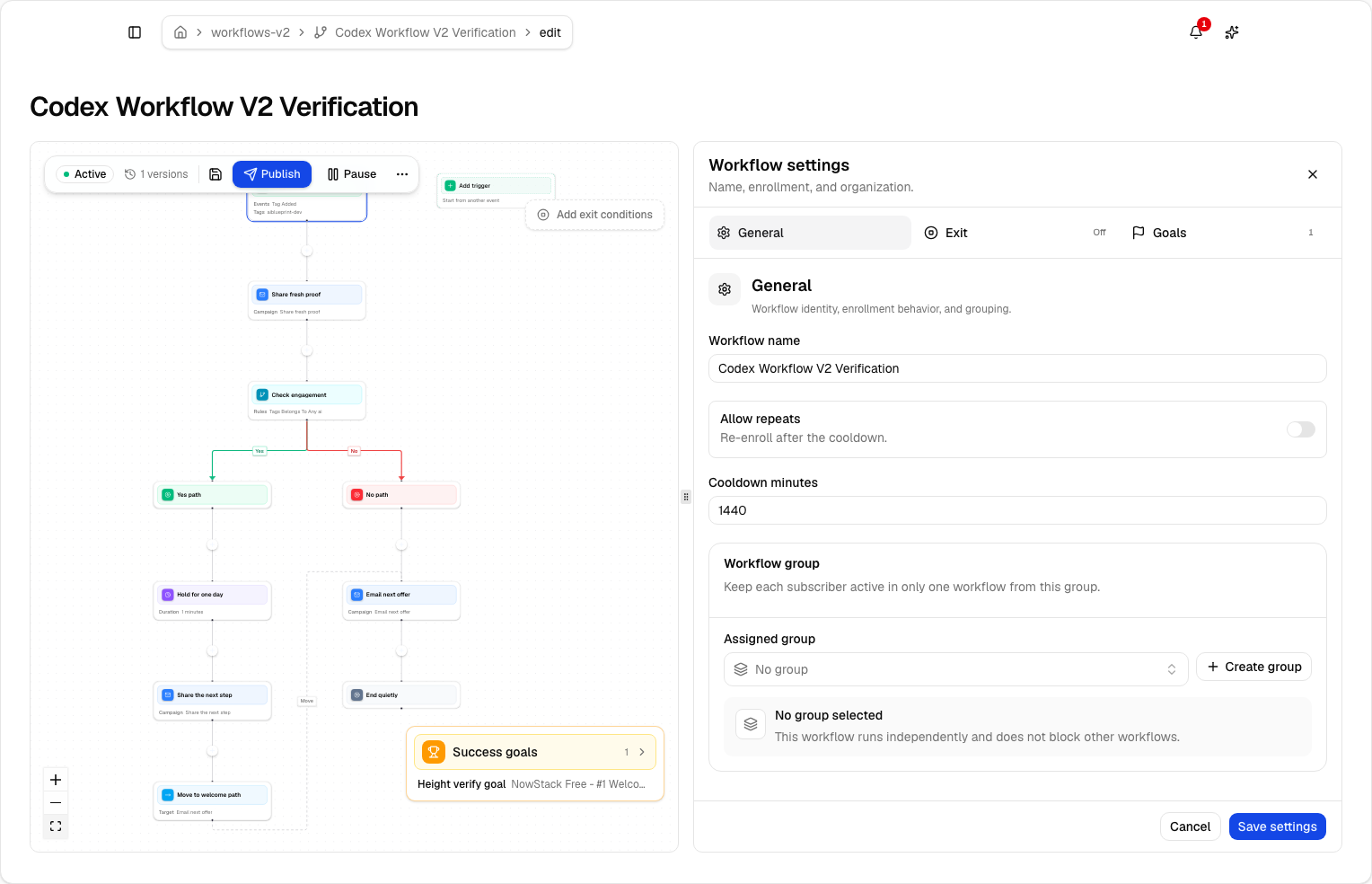
Lumail uses a graph-based workflow engine:
- subscriber, tag, event, schedule, and manual triggers;
- email, wait, action, and webhook steps;
- condition, event, and weighted branches;
- goals and exit rules;
- A/B paths;
- workflow groups for mutually exclusive journeys;
- draft and published definitions.
The same workflow tools are available in the app, through MCP, and via the CLI, SDK, and API, so an agent can build or debug a workflow and a human can review the graph visually. If your automations are simple event-to-sequence mappings, both models work. If you need branching journeys with goals, exits, and inspectable run history, the graph model gives you more to work with. The workflow documentation shows the full engine.
Compare the pricing model with your own numbers
Pricing is the secondary difference, but it is a real one, and the two models reward different usage patterns.
Lumail charges for emails sent, never for subscribers stored. Every plan includes unlimited subscribers:
- Free: 3,000 emails per month, no credit card;
- Premium: $20 per month with 40,000 emails included, then $0.60 per 1,000;
- Business: $200 per month with 400,000 emails included, then $0.40 per 1,000.
Loops uses subscribed-contact tiers. As of August 9, 2026, its free plan covers 1,000 contacts and 4,000 sends per month, and paid plans start at $49 per month for 1,000 to 5,000 subscribed contacts, with unlimited sends and full features on paid plans.
A worked example
Say you have 4,000 subscribed contacts and send two campaigns a month, about 8,000 emails.
- On Loops, 4,000 contacts is past the free plan's 1,000-contact limit, so you are on the $49 per month tier for 1,000 to 5,000 contacts, with unlimited sends.
- On Lumail, 8,000 emails exceeds the 3,000-email free plan, so you are on Premium at $20 per month, with 40,000 emails included and room to grow.
Now flip the usage. Keep the same 5,000 contacts but run a heavy lifecycle program that sends 300,000 emails a month. On Loops, the $49 tier still covers it because paid plans include unlimited sends. On Lumail, that volume lands at $176 on Premium (40,000 included, plus 260,000 at $0.60 per 1,000) or the $200 Business plan with 400,000 included. Loops is clearly cheaper for that pattern.
The general rule: send-based pricing wins when you store a large audience and contact it selectively, because subscribers cost nothing to keep. Contact-tier pricing with unlimited sends wins when a known, bounded contact base receives very high volume. Run your normal month, your launch month, and your projected list a year from now through both models before deciding. The Lumail pricing page has the full plan details.
Compare transactional email
Both platforms handle transactional email, with different boundaries.
Loops includes transactional email for non-audience recipients on paid plans, which fits its product-email focus: password resets and receipts go to users regardless of marketing consent.
Lumail runs transactional email in the same organization as campaigns and workflows, on every plan surface: through the REST API, the SDK, the CLI, agent tools, or SMTP at smtp.lumail.io:587 with STARTTLS. The SMTP relay matters if you have existing software that speaks SMTP and you do not want to rewrite it against a REST endpoint. Transactional messages carry their own priority so account email does not queue behind a newsletter batch. See transactional email vs marketing email for why the two streams should be separated operationally even when they share a platform.
Which platform should you choose?
Choose Lumail when your priority is:
- operating email with AI agents through MCP, ChatGPT, Claude, Claude Code, Cursor, and more;
- an audience that is broader than a SaaS customer database;
- advanced graph workflows with branches, goals, and exits;
- send-based pricing for a large stored audience;
- campaigns, workflows, and transactional email behind one API, SDK, CLI, and SMTP relay.
Choose Loops when your priority is:
- SaaS lifecycle email as the primary use case;
- a focused product-email interface without newsletter or publishing surface;
- unlimited sends for a contact base that fits a known tier;
- marketing and transactional messages together in a product built for that job.
Neither list makes one product universally better. Loops is a strong choice for the job it defines. Lumail covers that job plus the audiences, workflows, and agent operations outside it.
A low-risk migration plan
If you are moving from Loops, prove the system before moving the full contact base.
1. Export clean contact state
Export contacts, properties, unsubscribes, and suppressed addresses. Do not import only active contacts and lose the suppression history; it protects both compliance and sender reputation.
2. Authenticate the sending domain
Configure SPF and DKIM, verify the domain, and decide whether the From address changes. Keep Loops running while DNS propagates and tests complete.
3. Rebuild one lifecycle sequence as a workflow
Pick one sequence that matters, such as onboarding. Recreate the trigger, waits, branches, and exit conditions as a Lumail workflow, then run success, negative, and early-exit test subscribers through it and read the run trace.
4. Move transactional sending last
Point one low-risk transactional message at the Lumail API or the SMTP relay, verify delivery events, then migrate the rest. Because transactional email lives in the same organization, you can watch campaigns and product email from one place.
5. Compare the repeated work
Measure how long the weekly and monthly operations take on each platform, including what an agent can now do that previously required integration code or manual clicks. Decide on evidence from your own workflow.
Frequently asked questions
Is Lumail a Loops alternative?
Yes, if you want agent-operated newsletters and graph workflows with unlimited stored subscribers. Loops is the better fit if your whole job is SaaS lifecycle email on a bounded contact base.
Is Lumail cheaper than Loops?
A few thousand contacts with moderate sends often cost less on Lumail Premium than Loops' $49 contact tier. Heavy lifecycle volume on a known contact base is cheaper on Loops paid plans because those include unlimited sends.
What is the main difference between Lumail and Loops?
Loops is event-driven lifecycle email for a SaaS customer database. Lumail is an email operating system: campaigns, graph workflows, transactional email, and 89 MCP tools.
Can I migrate from Loops to Lumail?
Yes. Export contacts and suppressions, authenticate the domain, rebuild one loop as a graph workflow, send one campaign, then repoint transactional.
Try the operation that matters most
The fastest evaluation is concrete: connect an assistant to Lumail's MCP tools, ask it to draft a campaign or build a workflow, then review the result in the visual editor. That single loop shows you what agent-operated email actually feels like compared to an API you integrate by hand.
You can start Lumail free with 3,000 emails per month, unlimited subscribers, and no credit card, or read the documentation first.
Still evaluating the market? Browse the complete email platform pricing and comparison hub for Mailchimp, Kit, beehiiv, Substack, Brevo, ActiveCampaign, MailerLite, Buttondown, and Resend.