Enable Double Opt-In
Turn on native confirmation so new subscribers must click a link before they receive campaigns.
Double opt-in keeps people off your marketing list until they prove they own the inbox. The signup is the first opt-in. The confirmation click is the second.
Enable it before you collect subscribers in a market that expects consent evidence (France, the EEA, and most public capture pages). Lumail's native flow is the supported one — do not invent a custom confirmation state machine with the transactional API.
Watch the complete walkthrough
This five-minute walkthrough shows the complete journey: enable the setting, customize the confirmation email, find a pending subscriber, confirm from the inbox, and see a post-confirmation workflow send.
If the player does not load, watch the double opt-in walkthrough on Tella.
What it does
With Enable Double Opt-In on:
- A new subscriber is created as
PENDING_CONFIRMATION. - Lumail sends your confirmation email from the organization's default sender.
- The subscriber clicks
{{confirmUrl}}. - Their status becomes
SUBSCRIBED. Lumail storesconfirmedAtandconfirmationIp, writes a subscribed timeline event, and starts tag-triggered workflows.
Until that click, they do not receive campaigns or workflow marketing emails. Filter Subscribers → Pending Confirmation to see who is waiting.
How the confirmation works
Signup (form, API, capture page, integration)
        ↓
PENDING_CONFIRMATION  +  confirmation email (24h token)
        ↓
Click {{confirmUrl}}  →  /confirm?token=…
        ↓
SUBSCRIBED  +  confirmedAt / confirmationIp  +  workflows
The confirmation link is a single-use token URL. A second subscribe POST for the same pending address does not send a second email or rotate the token. If they never click, they stay pending — turning the setting off later does not subscribe them for you.
Existing SUBSCRIBED contacts are left alone when you enable the setting. Only new subscribers go pending.
Enable it
- Open Settings → Configuration. The URL is
/orgs/[your-org]/settings/configuration. - Find the Double Opt-In card.
- Turn Enable Double Opt-In on.
- Click Save.
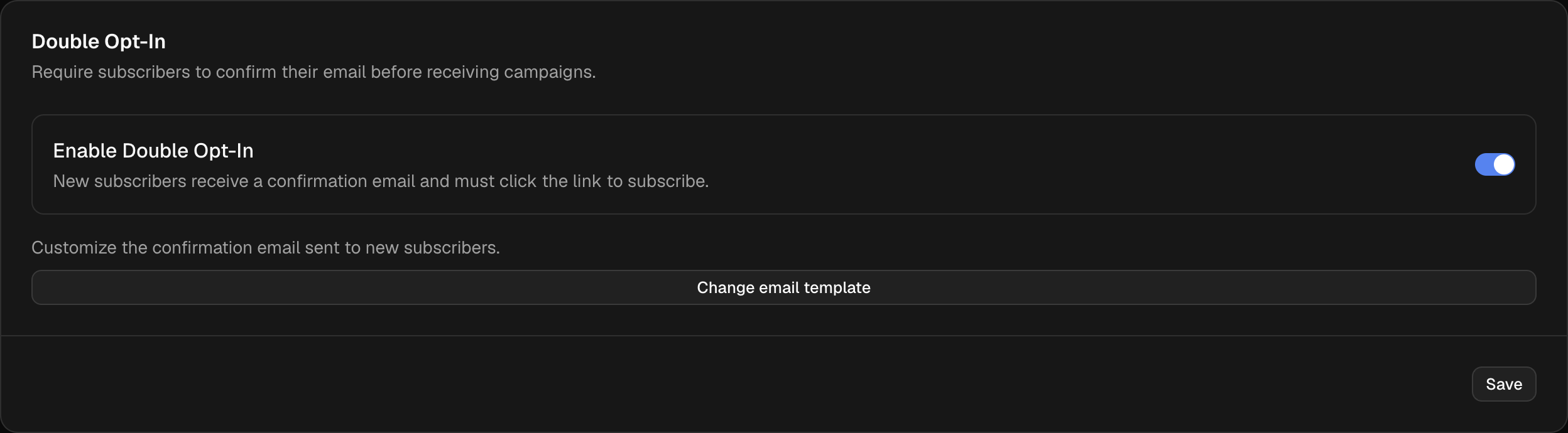
The first card on Configuration. The switch is organization-wide.
| Control | What it does |
|---|---|
| Enable Double Opt-In | New subscribers are PENDING_CONFIRMATION and get a confirmation email |
| Change email template | Opens the confirmation email editor (only after the switch is on) |
| Save | Persists the switch. The email template is saved separately inside the editor |
The card below it — Add transactional recipients to the marketing list — is a different path. Turning that on creates receipt/OTP recipients as SUBSCRIBED. Double opt-in does not apply there.
Customize the confirmation email
With the switch on, click Change email template.
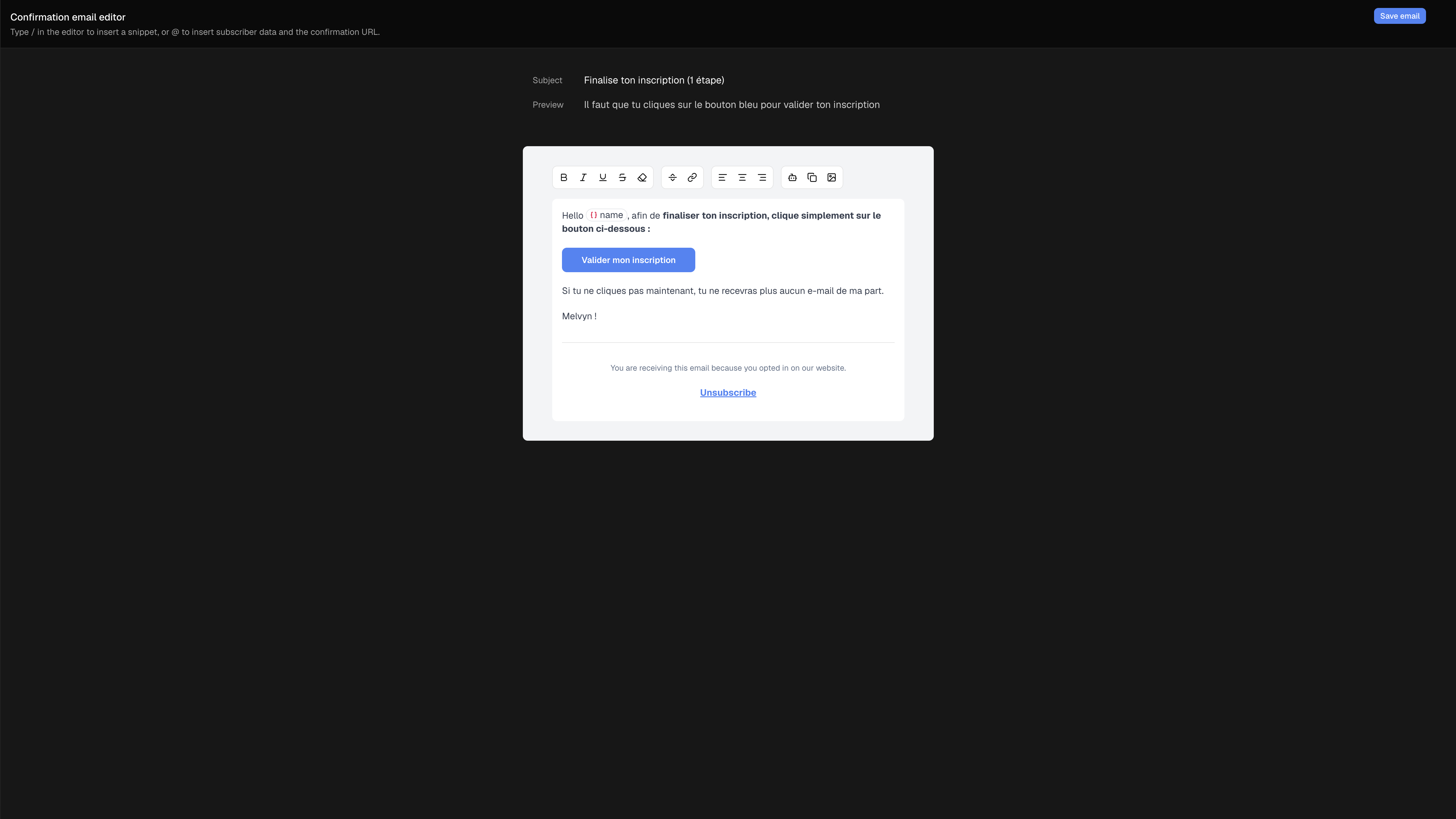
Subject, preview, and body. The blue button must point at {{confirmUrl}}.
| Data point | Detail |
|---|---|
| Subject / Preview | Inbox subject and preview text. Defaults are Confirm your email address |
{{confirmUrl}} | Required. Type @ and pick Confirmation URL, or /confirm to insert the confirmation button |
{{name}} / fields | Same subscriber variables as campaigns. @ opens the menu |
| Snippets | Type / to insert an organization snippet |
| Default sender | Confirmation emails always send from the organization's default sender |
| Save email | Writes the template. Missing {{confirmUrl}} falls back to the default template |
The recipient confirmation page (You're all set) follows Settings → Language, not the email body language. Translate the email yourself.
Test the complete journey
Use a test inbox after saving the setting and email:
- Submit a new email address through your public form or capture page.
- In Subscribers, clear any active status filter, or filter by Pending Confirmation, to find the new contact. A pending contact is not shown when the list is filtered to subscribed contacts.
- Open the contact and confirm that Confirm your email address appears in their recent email activity.
- Open that email in the test inbox and click its confirmation button or link.
- The confirmation page says You're all set. Back in Lumail, the contact is now
SUBSCRIBED; any eligible subscriber-created or tag-added workflow can enroll and send its first email.
If the contact is still pending, check that the template contains {{confirmUrl}} on a button URL or link, then save the email template again. Do not replace it with a URL from a different subscriber: confirmation links are single-use and recipient-specific.
After they confirm
The subscriber timeline shows that they confirmed their email via the double opt-in link and subscribed to the list. The confirmation-link click is labeled as such, not as a generic URL click.
Workflows that start on subscriber created or tag added wait until confirmation. Tags attached at signup are replayed after the click so tag-triggered workflows enroll a real SUBSCRIBED contact.
Campaigns only target SUBSCRIBED. Pending contacts never enter a send.
What uses double opt-in
| Source | New subscriber | Confirmation email |
|---|---|---|
| Capture page | PENDING_CONFIRMATION | Sent |
Subscribers API / SDK (POST /api/v1/subscribers or /api/v2/subscribers) | PENDING_CONFIRMATION | Sent (unless triggerWorkflows: false) |
API / SDK with skipDoubleOptIn: true | SUBSCRIBED | Not sent — no confirmation token |
| ClickFunnels / Systeme.io | PENDING_CONFIRMATION | Sent |
| Dashboard Add Subscriber | PENDING_CONFIRMATION | Sent only if Trigger workflows is on |
| Dashboard Add Subscriber with Skip double opt-in | SUBSCRIBED | Not sent |
| CSV import | SUBSCRIBED by default | Not sent — import writes status directly |
Transactional API / SMTP / lumail.emails.send | TRANSACTIONAL or SUBSCRIBED | Ignored. Not a custom double-opt-in mechanism |
Resubscribe of UNSUBSCRIBED / TRANSACTIONAL | SUBSCRIBED | Skipped |
skipDoubleOptIn defaults to false. New organizations have double opt-in on; existing organizations keep whatever they already stored. Trusted backends (checkout, server-side sync) should pass skipDoubleOptIn: true so those contacts stay SUBSCRIBED and tag-triggered workflows can enroll. Public forms must omit the flag.
triggerWorkflows: false still creates the pending subscriber when DOI is on. It skips the confirmation email. It is not a substitute for skipDoubleOptIn. Use skipDoubleOptIn for trusted sources; do not use either flag on a public form.
For the legal and evidence limits of confirmedAt / confirmationIp, see GDPR in Lumail.
Related documentation
- GDPR in Lumail — when to enable native confirmation
- WordPress Plugin — public
[lumail_form], never skips DOI - Create Subscriber API — signup payload and
triggerWorkflows - Language — confirmation page locale
- Subscriber Events —
SUBSCRIBEDtimeline events - Workflows — enrollments start after confirmation
- Account Verification — DOI also helps sender health
- Migration to high deliverability emails — branding, why-you-receive, OTP, and workflow setup